 Patched and Backed Up
Recovering a hacked website, step by step
Last reviewed
In short
- Stay calm, write down what you see, and lock the doors.
- Save a copy of the site as it is before you clean anything.
- Clean, update, then change every password a second time.
First, breathe
WordPress's help page for hacked sites says it plainly: you will recover from this.[1] A hack feels awful. But a plan helps. Work through the steps below in order.
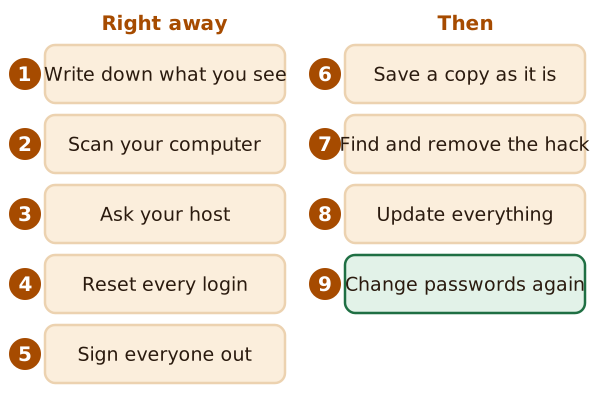
The first five steps are about getting control. The last four get the site ready and clean it up.
Right away
1. Write down what you see. The first step after a hack is documentation.[1] Note what looks wrong and what time you noticed it. WordPress asks for the time zone too.[1] Add anything you changed lately, such as a new plugin. This note helps you, and it helps anyone you ask for help.
2. Scan your own computer. Run a full virus and malware scan on the computer you log in from.[1] A hack sometimes starts there. If your first scan finds nothing, try a second tool.
3. Ask your host. The hack may affect more than your site, especially on shared hosting. Your host may already be acting, or may need to.[1] They can also tell you whether it's a real hack.
4. Reset every login. Force a password reset for all users, especially administrators.[1] This covers more than WordPress. It means every way in: your SFTP login, your hosting panel and your database.[1] That includes every other person who has access.[1] See access for staff and contractors.
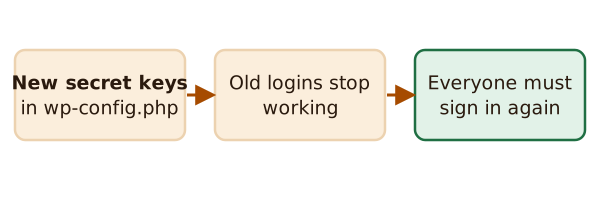
5. Sign everyone out. Someone may still be logged in. To clear them, put new secret keys in wp-config.php. That forces anyone still logged in to sign in again.[1]
Then
6. Save a copy as it is. Before you clean, WordPress suggests taking one more snapshot of the site as it is now.[1] Even a bad copy can help you work out what happened.
7. Find and remove the hack. This is the hard part. How you do it depends on what the hack did. If you don't feel able, ask your host or a security professional. You can also ask in the Hacked or Malware forum on WordPress.org.
If you reinstall parts of the site, use the same version of the software you were using.[1] Don't use the reinstall option inside WP-ADMIN.[1] Instead, upload fresh copies using your SFTP program.
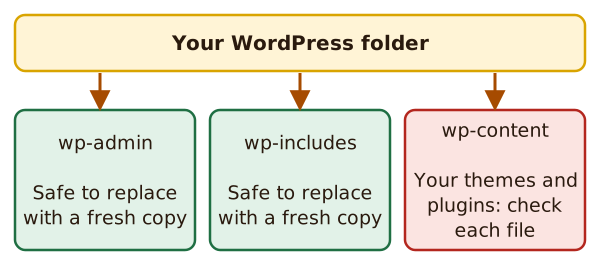
WordPress says you can safely replace the wp-admin and wp-includes folders.[1] Go more carefully through wp-content, which holds your themes and plugins.
Then look at your .htaccess file. Hacks often change it.[1] Also check files like index.php and header.php. If these are changed, they can affect every page request.[1]
8. Update everything. Once you're clean, update WordPress, plugins and themes. Older versions are more prone to hacks than newer ones.[1] See keeping software updated.
9. Change your passwords again. Change them after you know the site is clean, even if you changed them earlier.[1]
After you're back
Try to work out how they got in. This is called forensics, the process of understanding what happened.[1] It's hard to do alone, and you may not find an answer. But even a guess helps you close the door.
Then put the habits in place. Read how small sites get hacked again, and check your backups.
What's next
Go back over the habits that keep the doors shut. Start with logins, passwords and two-factor.
Sources
- FAQ My site was hacked, WordPress.org Documentation (accessed 2026-11-12)